
Sharing settings between stores
You can manage multiple stores in a single administration panel. By default, all store settings must be configured individually. However, we offer the ability to share settings between stores.
Enabling and configuring sharing
Sharing selected options in one store and downloading them from another is possible in the panel, in: Settings > Shops' configuration. After selecting a store and clicking Edit at the bottom, you'll see the option to enable sharing. You can choose which store you want to download settings from.
Expert advice
Enabling sharing is only possible if you have more than one store in a given panel.
You can't select a store to download settings from if that store already downloads settings from another store. If store B downloads settings from store A, then if you want to download settings from store B in store C, you won't be able to. You need to designate store A as the store from which store C should download settings.
Attention
You can't share settings with a store where other stores already download settings. This means that if store B already downloads settings from store A, then store A can't download settings from store C.
Once you've selected a store, you'll be presented with a list of settings you can choose from. Below, we'll describe each option:
Sharing options
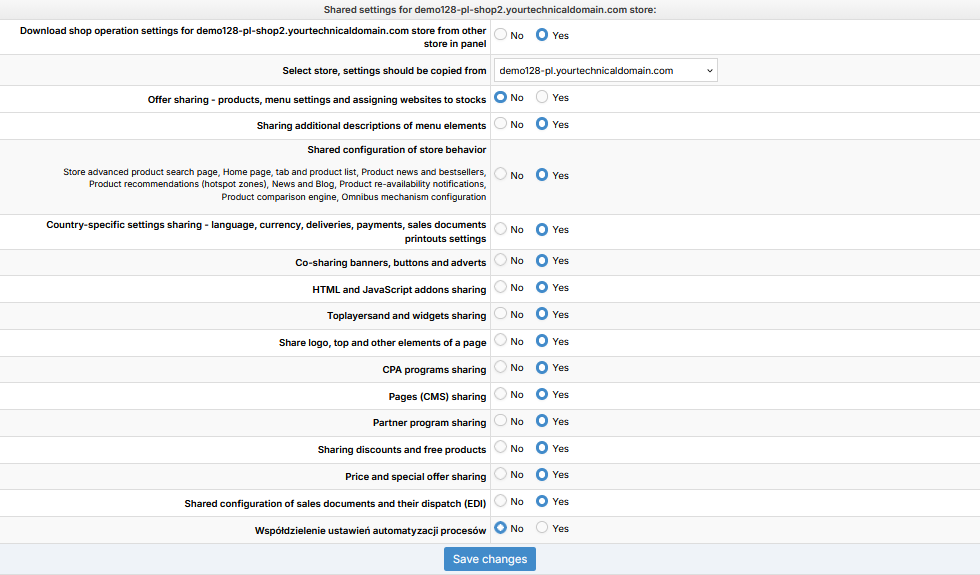
Available settings sharing options
Offer sharing – products, menu settings, and warehouse page assignments – after enabling this sharing option, the tab on the product card's visibility page will not be editable per store. You will be able to globally hide or unhide the product for all stores that share this setting. Sharing also applies to individual menu nodes between stores (SHOP> Menus and descriptive subpages) and warehouse assignment to both stores (WAREHOUSE (WMS) > stock management).
Attention
This setting does not share item prices. It only shares item visibility. Price sharing is described below under " Price and Promotion Sharing."
Expert advice
Sharing an offer also shares the settings for warehouses and returns warehouses.
Sharing additional descriptions of menu items - this option is responsible for sharing configuration settings available in the module SHOP> Menus and descriptive subpages.
Sharing Store Behavior Configuration – This option is responsible for sharing the configuration settings available in the module SHOP> Kontrola dostępu do strony . This setting shares many key settings in store operation, such as: Page Access Control; Omnibus Mechanism Configuration; Product Lists.
Sharing country-specific settings - language, currency, deliveries, payments, sales document print settings - this option is responsible for sharing configuration settings available in the modules:
Settings> Payments
Settings> Delivery configuration
Settings> Sales documents (EDI)
Sharing banners, buttons and ads - this option is responsible for sharing the configuration settings available in the module (link to the article about this module) .SHOP> Banners and Buttons
Sharing HTML and JavaScript add-ons - an option responsible for sharing configuration settings available in the module (link to an article about this module). SHOP> HTML/JS Add-ons
Sharing toplayers and widgets - an option responsible for sharing configuration settings available in the moduleSKLEP > Toplayery (link to an article about this module).
Sharing logo, top and other page elements - an option responsible for sharing configuration settings available in the moduleSKLEP > Logo top i inne elementy strony .
Sharing CPA programs - an option responsible for sharing configuration settings available in the moduleMARKETING > Programy CPA/CPS (link to an article about this module).
Page sharing (CMS) - sharing CMS subpages - an option responsible for sharing configuration settings available in modules (link to an article about this module).SKLEP > Dodatkowe treści CMS
Affiliate program sharing - an option responsible for sharing configuration settings available in the modulePROMOCJE I RABATY > Program partnerski .
Sharing Discounts and Free Items - When enabled, all settings related to discounts and free items will be shared. This option allows you to share configuration settings available in the modulePROMOCJE I RABATY > Promocje i oferty .
Sharing prices and promotions – an option responsible for the settings for sharing price and promotion settings in products.
Sharing the configuration of sales documents and their shipment (EDI) - an option responsible for sharing the configuration settings available in the moduleUSTAWIENIA > Dokumenty sprzedaży (EDI), related to disabling the printouts of these documents.
Sharing process automation settings - an option responsible for sharing configuration settings available in the moduleUSTAWIENIA > Automatyzacja procesów (after enabling this option, you can select additional modules to be shared).
Disabling sharing
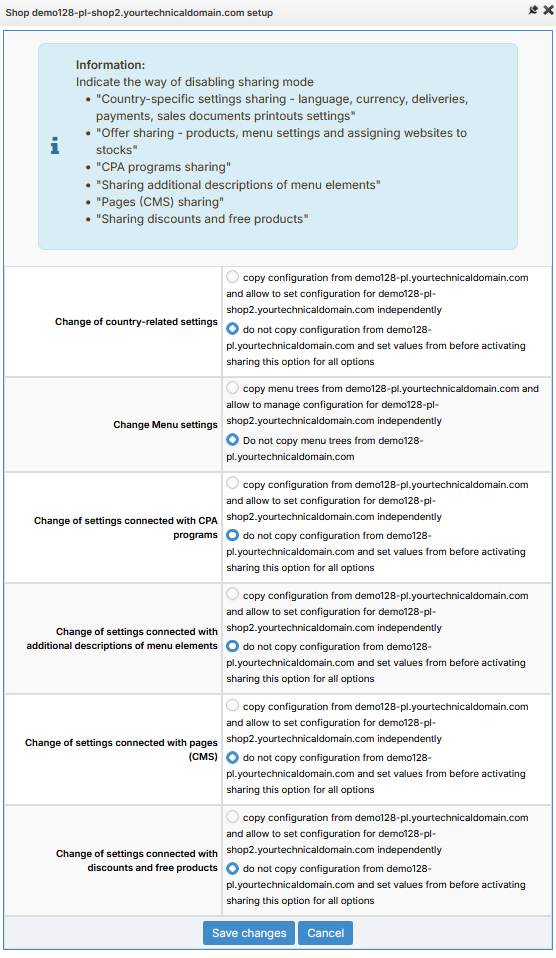
When disabling selected sharing options, you'll be asked how to disable them. You can copy individual options or disable sharing between stores. Simply select what you want to do with the shared settings in the message shown in the attachment below.
Disabling sharing
Tip
If you disable offer and price sharing, you'll be prompted to copy the settings for the menu tree and product prices in the specific store (where you disabled sharing). Depending on the size of the tree and the number of items, the copying process may take longer due to the expansion of the menu tree and the need to copy prices.
Visibility of shared modules in the administration panel
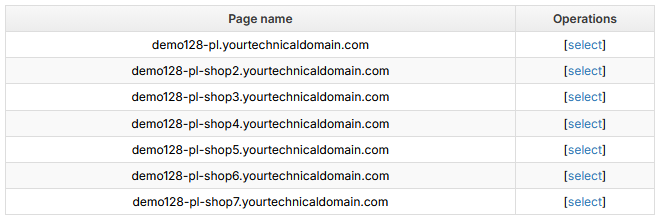
When you are working in the panel and enter a module that allows sharing between stores, a list of stores will be displayed:
Sharing settings between stores - no sharing
Tip
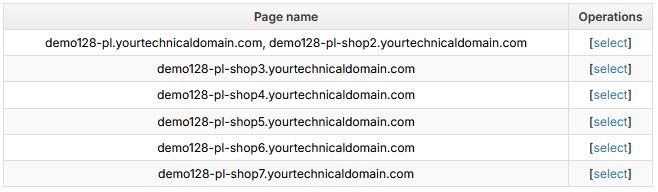
When the first store shares settings with the third store, the list will be changed and the first and third stores will be in the same position on the list.
Updated 6 months ago